
Software Updates & New Features
From Us to You: New Ideas, New Possibilities.
More Features. More Possibilities.
With every update, we bring new ideas and improvements to BabtecQ. Here's what that means for you:
- New features that open up more possibilities
- Improvements that simplify your workflows
- Ideas inspired by real-world experience that deliver real value
It's worth taking a look at the latest update: Great ideas have turned into new features that take BabtecQ to the next level. And here's a little preview: There's a lot to discover!
Discover the Highlights of Our Latest Software Update:

AI-Powered Complaint Management with Quorix
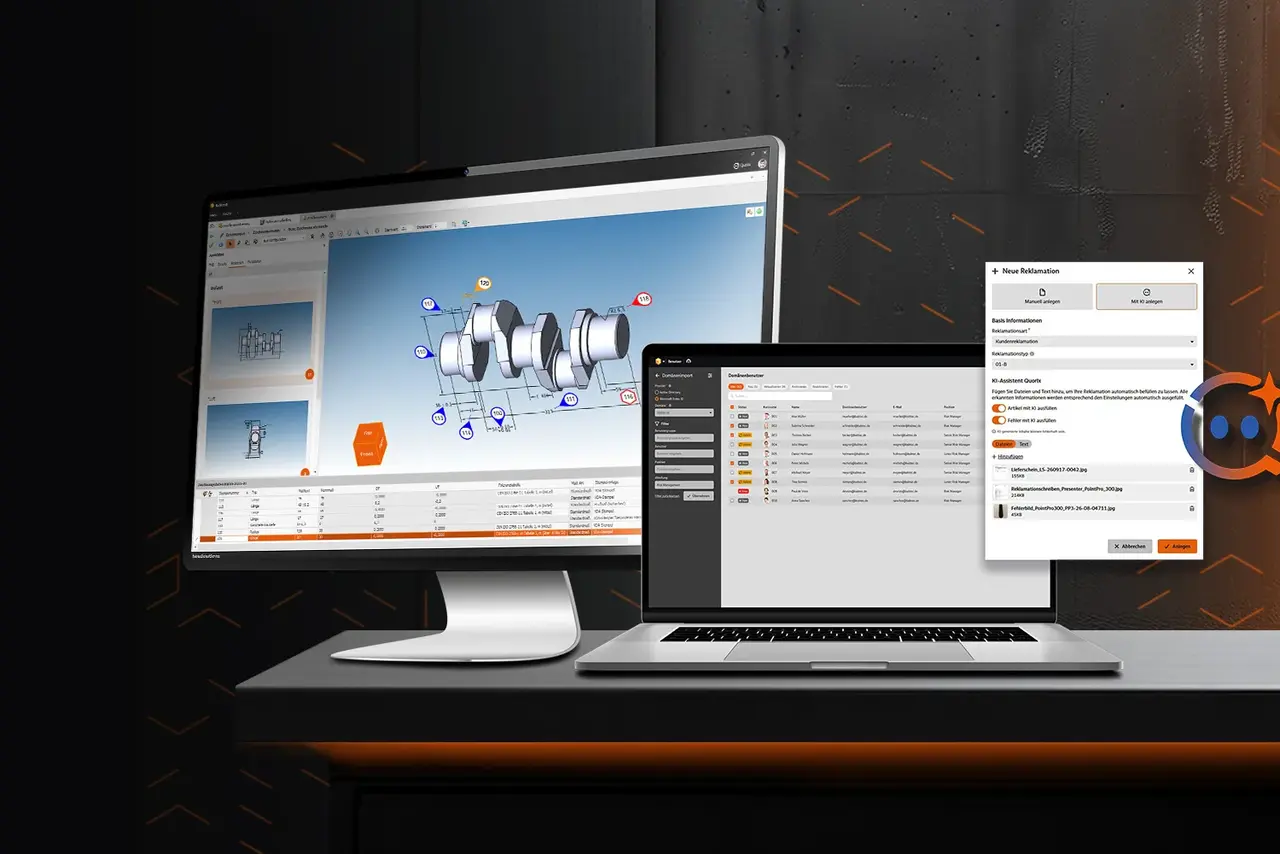
Less routine work, informed decisions, and long-term solutions: Quorix uses artificial intelligence to support you throughout the entire complaint management process – from recording new complaints and analyzing root causes to selecting the right corrective actions.
The AI assistant makes your daily work easier by reducing time-consuming data entry and research while providing helpful suggestions for potential causes and corrective actions. This allows you to handle complaints not only faster but also more thoroughly. Connections become easier to identify, and potential solutions that might otherwise be overlooked can be considered.
You're always in control of the final decision. Quorix provides suggestions that you can review, adjust if necessary, and choose to apply. Nothing is saved without your approval. The more complete your complaint data is, the more effectively Quorix can support you.
This gives you more valuable time to focus on what matters most: evaluating complaints, resolving quality issues for the long term, and continuously improving your processes.
Easily Manage Users and Permissions in Your Browser
Manage users centrally, control permissions with ease, and keep everything in view: With BabtecQ Go, you can manage users, user groups, and access permissions directly in your browser – without the need for an installed Windows client.
In the "Users" and "User Groups" modules, you can define who has access to specific features of Babtec software. You can use existing domain users and import centrally maintained master data. User groups make it easy to assign access permissions efficiently and automatically pass them on to the users within each group.
Clear structures and an intuitive interface make administration easier – even on mobile devices. Enhanced list views provide important user information at a glance. All access permissions are clearly organized by module and show whether a Basic or Pro license is required. Convenient filtering options help you quickly identify which permissions are active and which have been inherited from user groups.
This makes user and permissions management simpler, more transparent, and more efficient. You can reduce administrative effort, maintain control over access permissions, and establish clear structures for the secure use of your Babtec software.
Clearly Mark 3D CAD Models with Stamp Symbols
Identify and match dimensions and characteristics directly in the 3D model: With the integrated stamping feature in BabtecQ, stamp symbols can now be displayed not only on 2D drawings but also directly in 3D CAD models.
When stamping a 3D model, stamp symbols are automatically placed in the corresponding positions. For optimal visibility in the CAD viewer, you can move or rotate individual symbols as needed. This ensures that the markers remain clearly visible, even when rotating complex 3D models.
This provides a clearer overview and makes it easier to identify quality characteristics. Dimensions and characteristics can be identified directly on the component without having to rely solely on the drawing's dimension table.
Visual markers make working with 3D CAD models easier, reduce the time spent searching for information, and support efficient and traceable quality assurance.
More Than Just New Functions
Curious to Learn More?
Would you like to learn more about our software, regular updates, or specific features? Let's talk! Our experts are happy to answer your questions and show you how BabtecQ can support your quality management processes.